> For the complete documentation index, see [llms.txt](https://developers-apps-in-toss.toss.im/llms.txt). Markdown versions of documentation pages are available by appending `.md` to page URLs; this page is available as [Markdown](https://developers-apps-in-toss.toss.im/guide/en/operation/console-workspace.md).
# Register a mini app
### 1. Sign up
To use Apps in Toss, first [Apps in Toss console](https://apps-in-toss.toss.im/)Please access it and sign up. Sign-up is based on Toss Business membership.
Two conditions are required to sign up.
* You must be at least 19 years old.
* You must have the Toss app logged in under your own name.
***
### 2. Create a workspace
A workspace is a space where team members manage projects together.
* Only one workspace can be created per business.
* The name cannot overlap with another workspace.
Please give your workspace an easily recognizable name, like a team or project name.
Next, please enter the creator name. The creator name is the name that shows who made the mini app on the detail screen. Users can tap this name to see other mini apps made by the same creator.
#### Creator name What is a creator name?
The creator name is the name that shows who made the mini app on the detail screen. Users can tap this name to see other mini apps made by the same creator.
You set it once when creating the workspace, and it applies the same way to all mini apps registered in this workspace. Think of it as a brand name that introduces you to users. If you already have a company or brand name in use, we recommend using it as is, and if not, you can freely create one with your own meaning.
#### Where is it shown?
* Mini app detail screen: This shows who made the app.
* Inquiry replies: This name is used when responding to user inquiries.
Rather than thinking about just one place, please choose a name that will be used in all three places. It takes about 10 minutes for the registered name to appear on the app detail screen.
#### Please name it like this
* Keep it within 10 characters, including spaces.
* You can use only Korean, English letters, and numbers.
* You cannot use a name already used by another creator. Names that differ only in spacing are also considered the same.
#### You cannot use names like these
* Names that impersonate or confuse the Toss brand (e.g. `TossOO`, `toss~`, `Viva RepublicaOO`)
* Names that impersonate or confuse another company's brand (e.g. `KakaoOO`, `NaverXX`)
* False or exaggerated expressions (e.g. `No. 1 in Korea`, `State-certified`)
* Names containing special characters and emojis
* Names made up entirely of profanity
* Expressions that evoke adult content, gambling, or illegal activity
{% hint style="warning" %}
**Please make sure to check**
If a legal dispute arises because you used a name that impersonates or confuses another company's brand, Toss is not responsible.
{% endhint %}
How to edit the creator name
You can change the creator name in the workspace's 'My Info' menu.
***
### 3. Manage members
The person who created the workspace is automatically granted 'main administrator' privileges.
The main administrator is responsible for operating the workspace and can agree to the service terms. Only administrators can apply for main administrator, and members cannot. [Delegate main administrator privileges](https://developers-apps-in-toss.toss.im/guide/operation/undefined)
#### Invite members
In the 'Members' menu, click '+ Invite' and enter a team member's email to invite them by role.
* **Administrator**: Can manage the entire workspace and view settlement details.
* **Member**: Can view and manage information in apps they have permission for.
***
### 4. Register an app
After creating the workspace, please register an app by clicking '+ Register' in the 'Apps' menu. You can register apps even before development is finished.
> **Want to manage development apps and live apps separately?**
>
> Please register the apps separately within the same workspace. You can register test apps and production apps separately.
You can create an app by entering only the information below.
You can fill in the remaining app information as it becomes ready, and each item can be saved as a draft.
#### App name
This is the name shown in the Toss app. Please choose a name that makes it easy to tell what the service is at a glance.
* If you already have a brand or service name in use, we recommend using it as is.
* You can change the app name later in App Info.
**Please follow the rules below for the English name.**
* Choose a noun-based name within 15 characters that is easy to pronounce.
* Do not use imperatives or verb phrases.
* Use a brand-name style, like 'GoRide Taxi' instead of 'Book a Taxi'.
* Do not use a standalone common word whose meaning differs from the Korean app name.
* Use 'GoRide Taxi' instead of 'Taxi'.
* Avoid using three or more words, or compound words that are hard to read.
#### appName
When the app scheme is invoked, it moves to the Apps in Toss service based on this ID.
* `intoss://` It is structured in this format. If the rules are not followed, server certificate issuance may fail.
* Once appName is registered, it cannot be changed, so please enter it carefully.
#### App type
Please choose the app type depending on whether the app you're creating is a game or not. The app information fields you'll enter later will vary depending on the selected type.
***
### 5. Enter app information
Before launching the app, go to App Info, click \[Edit], fill in all remaining app information, and request a review. You can launch the app only after the app information review is complete.
#### 5-1. Basic information
#### Subtitle
Please write a short subtitle so users can easily understand what service is available.
* It may appear under the mini app name when searched in the full menu.
* Profanity and exclamation marks cannot be used.
#### Detailed description
Based on the detailed description, it may be selected for Toss Home advertising. Please describe as specifically as possible what users can experience in the service.
Please describe the process from when the user first launches the service to when they experience the core features. It is good to explain it in sentence form following the flow of 'service access → action → result'. Focus on what the user actually sees, what they tap, and what experience they have.
Example: Scholarship information service
(X) We provide filters.
**(O) We provide filters based on overseas scholarships, region of residence, and household member information.**
(X) If you sign up for alerts, we tell you scholarship information that's just right for you.
**(O) If you sign up for alerts, we notify you of the scholarship amount and application deadline that fit you best, based on your region of residence and household member information.**
Example: Defense game
Enemies descending while holding umbrellas
Use weapons such as lightning, arrows, and fists
You can choose a weapon every two turns
Defeat monsters 10 times to receive 20 gold
Press the attendance button on the right to receive 100 diamonds on your first check-in
#### Eligible age
Apps in Toss is currently available only to users aged 19 or older.
#### Customer inquiry email
Please enter the customer inquiry email information so we can respond smoothly to inquiries.
***
#### 5-2. Categories and display
#### Category
Please select the category that best fits the mini app you're launching. If it differs from the actual service, we will change it to the appropriate category during review and let you know.
Game app
Please select the category that matches the genre of the game you're launching.
If it is a web board game, you must check 'Web board or not'. [Notes for web board game services](https://developers-apps-in-toss.toss.im/intro/caution#web-board)
Non-game app
You can set the major, middle, and minor categories.
You cannot select a category that is the same as the middle category you already chose. For example, if you selected 'Travel' as the middle category, you cannot select 'Travel' again as the second category.
#### Display information
Below is the information to enter in the 'Categories and display' section. You can check the items commonly required for all mini apps and the items required depending on whether it is a game or not.
#### App logo
The app logo is displayed in Mini App Home in the Toss app's full menu. Non-game apps are also displayed in the top common navigation bar.
* It should be clear even on small screens.
* The service characteristics should be apparent at a glance.
* It should not be confused with other apps, and it must not have copyright issues.
* Please use colors and shapes that look natural in dark mode as well.
* Please create it as a square 600 × 600 px PNG file.
* Rounded corners cannot be used. (A background color is required; transparent backgrounds are not allowed.)
* Icons and image resources provided by Toss cannot be used as app logos. (Including derivative works)
#### Thumbnail image (game app)
Thumbnail images are used across various surfaces in the Toss app, and they are the first images users see before accessing the service. Please make them so users can understand what the service is at a glance and get a good impression.
* Please upload it as a 1932 × 828 px PNG file.
* Please use an image that shows the mini app's core gameplay screen or main features.
* Use a clear high-resolution image, and do not enlarge a small image.
* Create it according to the specified format, and do not fill empty spaces with color or blur.
* Do not include elements that contain bias, such as profanity or political expressions.
* Do not use too much text. If needed, include only a logo or a short phrase appropriately.
* When using a logo, make sure the service name is clearly visible.
* Differentiate it so it won't be confused with other apps.
* Please use images with no copyright issues.
* Icons and image resources provided by Toss cannot be used as thumbnails. (Including derivative works)
Recommended exampleNot recommended example
#### Screenshot
Screenshot images are used in Toss search results and app previews.
* Submission is optional. However, submitted mini apps will be reflected in order and will appear in Mini App Home first.
* You can use either custom-made images or screenshot-style images.
* Since it is used in search results and app previews, please use an image that lets users understand the mini app's features at a glance.
* If you include images, upload at least 3 portrait images and at least 1 landscape image.
* Portrait format: 636 × 1048 px, PNG file
* Landscape format: 1504 × 741 px, PNG file
#### Leaderboard (game app)
This is a feature that ranks users based on their scores. Please set policies such as the score unit to record and the sorting criteria.
***
#### 5-3. Game rating classification
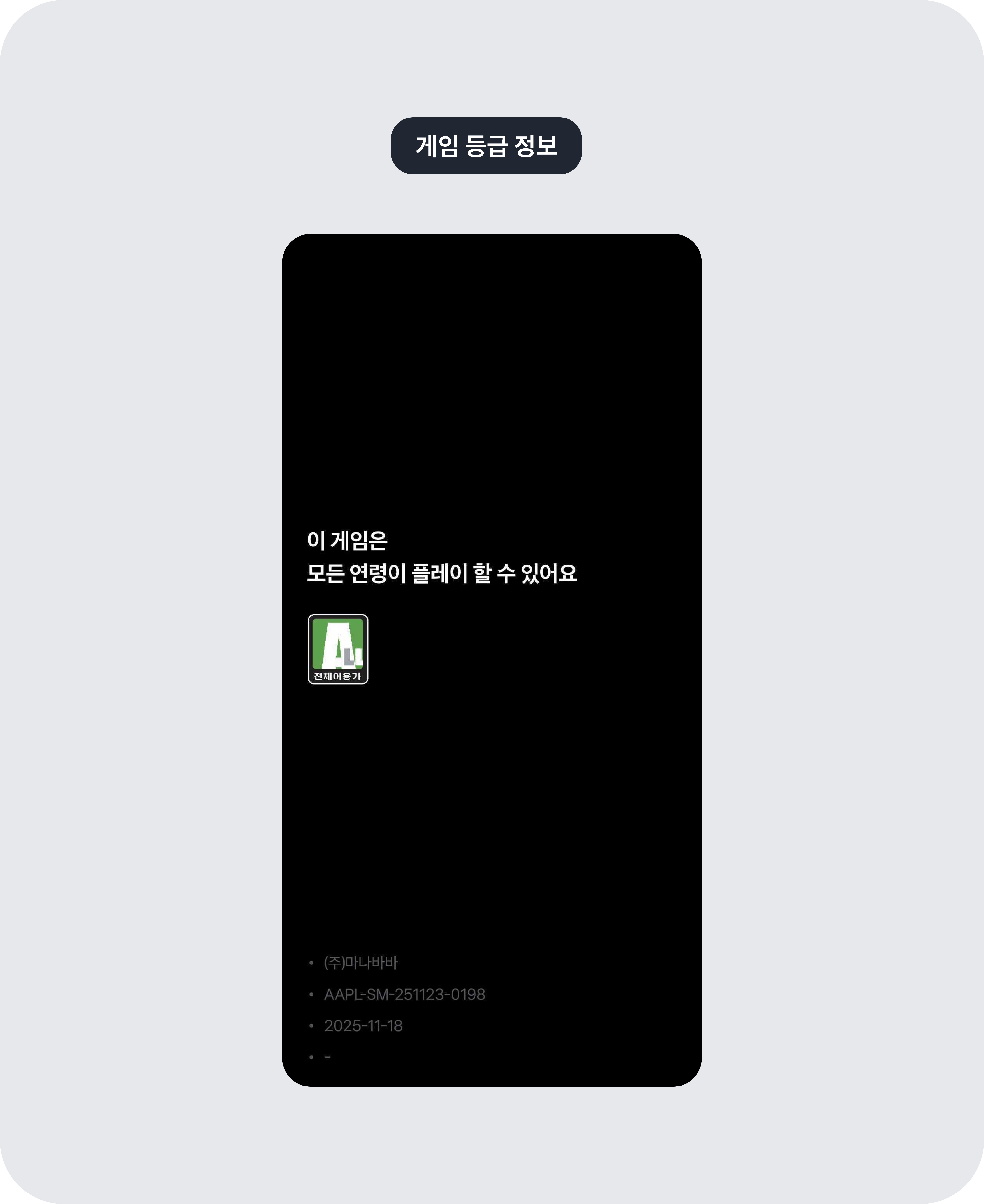
Games must submit proof of rating review. The information you enter will be displayed as follows starting from Toss app version 5.240.0.
#### 1) If you received release review from a store, enter the store URL
If you received a rating classification from an open market (App Store, Google Play Store, One Store, Microsoft Store), you must enter the URL of the game page released on the open market and the self-rated game information.
> **Why do I need to enter game rating information and self-rated game information?**
>
> According to the Game Rating and Administration Committee's regulations, this is to verify that the game rated by the self-rating business operator and the game to be released through Apps in Toss are the same game. If this is not followed, it may be considered an unrated game and could lead to measures such as correction recommendations, investigation referrals, or administrative action referrals.
**Game rating information**
Please change it to 'Store link' and enter the link to the page where the game is released.
**Basic information**
* If you are a business operator, please enter the information on your business registration certificate.
* If you are an individual developer (non-business), please enter your personal information.
**Self-rated game information**
To enter the information below, first look up the game released on the open market on the Game Rating and Administration Committee's 'Self-rated Game Lookup' page.
* **Registrant name**: Please enter the registrant name shown in the store. For Google Play Store, enter the developer name; for Apple App Store, enter the provider name.
* **Self-rating business operator name**: Please enter the business operator name of the open market that conducted the self-rating, such as 'Google', 'Apple', or 'One Store'.
* **Rating classification date**: Please enter exactly the same rating classification date as shown in the Game Rating and Administration Committee lookup.
* **Rating classification number**: Please enter exactly the same rating classification number as shown in the Game Rating and Administration Committee lookup.
* **Age rating**: Please select the same age rating as shown in the Game Rating and Administration Committee lookup.
* **Content information**: Please select all items shown in the content information from the Game Rating and Administration Committee lookup. Even if it is suitable for all ages, select it if content information is present.
* **Representative seal or signature image**: Please attach an image of the representative's seal or signature. Stamp the seal or sign on white paper, then attach the image.
**Attach screens containing the game's main content (play screens)**
* Please attach 2 gameplay screens of the game that received self-rating (released on an open market) and 2 gameplay screens of the game being released through Apps in Toss.
* Do not edit them separately; attach the original play screens as they are.
* If the content information includes sexual content or violence, attach the corresponding game screen images for each.
What if the game registrant name and business operator name are different?
If the registrant name on the self-rated game differs from the actual business operator name, it will be rejected during review. If you can explain the reason for the discrepancy, please submit supporting documents or an additional explanation.
* **Individual (non-business)**: Please explain why the registrant name and business operator name are different.
* **Business operator (individual or corporation)**: Please submit a certified copy of the registry to explain reasons such as a change in the business name.
#### 2) If you received a review from the Game Rating and Administration Committee, attach the certificate as a PDF file
**Game rating information**
Please change it to 'Game Rating Classification Certificate' and attach the rating review certificate as a PDF. [How to apply for game rating classification](https://toss.im/apps-in-toss/blog/game_rating_classification)
**Self-rated game information**
Please enter exactly the same information as shown on the Game Rating Classification Certificate.
***
### 6. Request review
After completing the entries according to the app registration guidelines **'Request review'** Please click the button. The review takes 1–2 business days, and the result will be sent via the console and email.
---
# Agent Instructions
This documentation is published with GitBook. GitBook is the documentation platform designed so that both humans and AI agents can read, navigate, and reason over technical content effectively. Learn more at gitbook.com.
## Querying This Documentation
If you need additional information that is not directly available in this page, you can query the documentation dynamically by asking a question.
Perform an HTTP GET request on the current page URL with the `ask` query parameter, and the optional `goal` query parameter:
```
GET https://developers-apps-in-toss.toss.im/guide/en/operation/console-workspace.md?ask=&goal=
```
`ask` is the immediate question: it should be specific, self-contained, and written in natural language.
`goal` is optional and describes the broader end goal you are ultimately trying to accomplish on behalf of the user. GitBook uses it to tailor the answer towards what is most useful for that goal.
The response will contain a direct answer to the question and relevant excerpts and sources from the documentation.
Use this mechanism when the answer is not explicitly present in the current page, you need clarification or additional context, or you want to retrieve related documentation sections.


.png?alt=media&token=29b9ecc1-20a8-4276-808f-596ecda39708)


.png?alt=media&token=3a7a9717-68b2-48de-bc37-2c8e80520544)