> For the complete documentation index, see [llms.txt](https://developers-apps-in-toss.toss.im/llms.txt). Markdown versions of documentation pages are available by appending `.md` to page URLs; this page is available as [Markdown](https://developers-apps-in-toss.toss.im/guide/en/marketing/guideline.md).
# External advertising guide
When marketing a mini app service opened in Apps in Toss, you can check items such as the 'marketing message', 'Toss mini app badge', and 'marketing design template' that you need. Using these can help partners market more effectively.
### What are external advertising guidelines
Apps in Toss's external advertising guidelines are the standards that must be followed when promoting a mini app service launched on Apps in Toss through external channels. The purpose is to help you use the 'Toss Mini App' and 'Apps in Toss' brands accurately and comply with policies.
* **Apps in Toss (Apps-in-Toss)**: The official name for backend partners, referring to the system and ecosystem where mini apps can be opened.
* **Toss Mini App (Toss Mini App)**: the UI and marketing/promotion term provided to B2C users within the Toss app.
* **\[Service name]**: the name displayed in Toss Mini App and searchable in the Toss app.
***
### Marketing **Message**
When marketing a mini app opened on Apps in Toss, headlines and copy should be written with the user experience of the Toss app in mind. You should use a call to action (CTA) that encourages people to explore services opened in Toss, or wording that can be recognized as a 'Toss Mini App'.
**Sample slogan templates**
Use the messages below and social hashtags (#) to introduce your mini app service.
* Experience \[Service name] as a 'Toss Mini App'.
* Meet \[Service name] in 'Toss'.
* Search for \[Service name] in 'Toss'.
* Try \[Service name] on Toss without installation.
* \#ServiceName #TossMiniApp #MeetOnToss
**CTA button examples**
When encouraging conversion to a mini app service, as in performance marketing, try encouraging app use with the messages below.
* Go use Toss Mini App
* Use \[Service name] on Toss
* Try \[Service name] on Toss
**You cannot use terms other than 'Toss Mini App launch'.**
In marketing channels, you should only use the expression 'Toss Mini App launch'. Please do not use the expressions below.
* Toss official partner
* Toss vendor
* Toss partner
**Please write it so it is not confusing who provides the service.**
You cannot use images or expressions that may cause users to mistake the provider of the partner company's service for Toss, or confuse them about the scope of partnership or operation with Toss.
* Advertise on Toss now.
* Since it's used by half the nation, the impact is undeniable.
***
### Toss Mini App badge
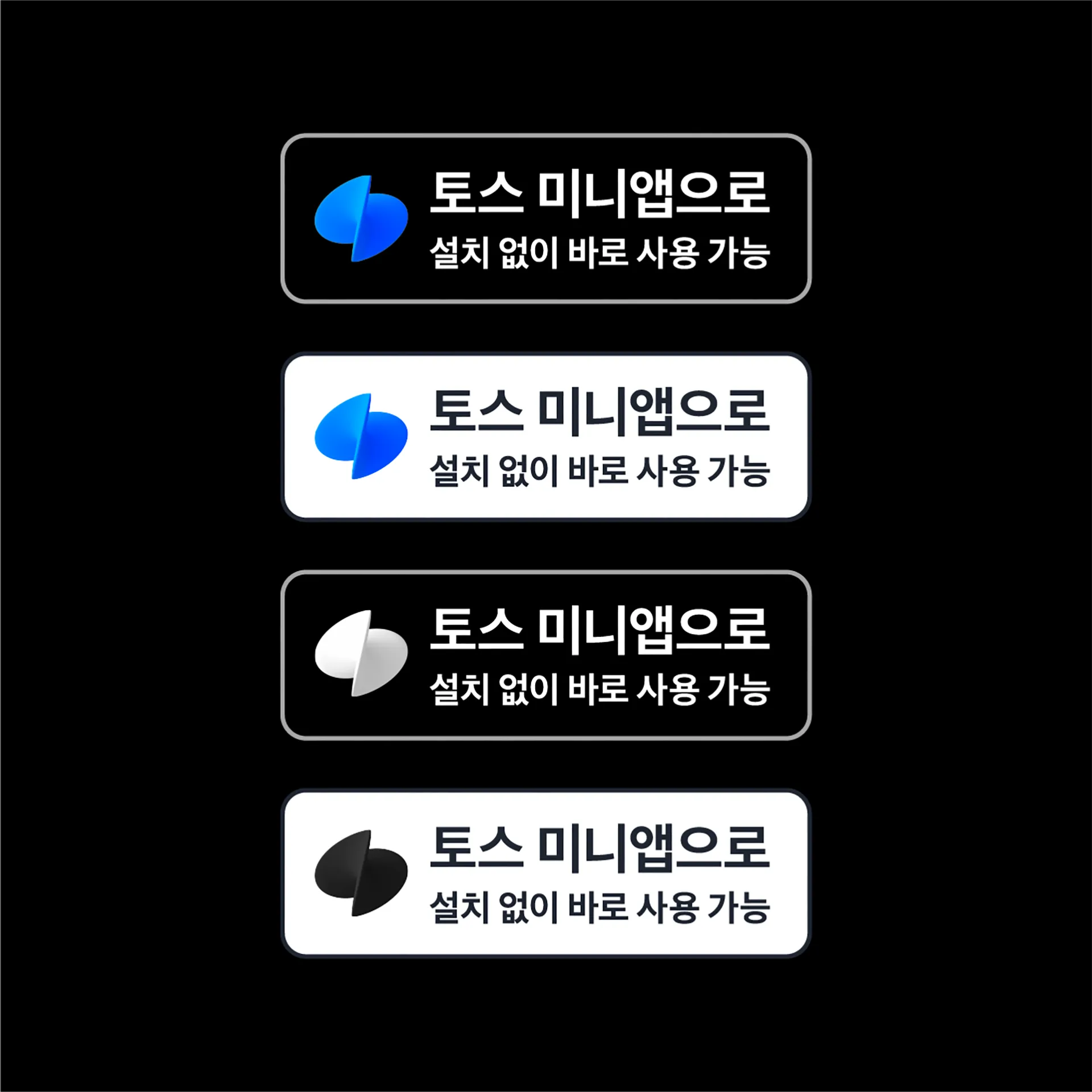
Use the 'Toss Mini App badge' attached in the file below to encourage app usage across all digital and print marketing materials.
* Use the black badge as the default. The white badge can only be used when the black badge is judged difficult to use visually.
* You can use only one 'Toss Mini App badge' per layout or video.
* Place the badge below the app image or main message so that it does not become the central artwork.
* Do not modify the badge, change its angle, or add animation effects.
{% file src="/files/e07e81202ac04a262f4fb565133f49d5a917e9e7" %}
***
### Marketing design template
Easily announce the launch of Toss Mini App with the marketing design template attached below. Without any separate design work, you can create images of various sizes and styles by inserting \[Service name] and \[Service logo]. Please check the file attached below.
{% file src="/files/e59094aea7e135c6112999827e7953252691aa66" %}
***
### Apps in Toss logo
The Apps in Toss logo can mainly be used together with \[Company name (developer name)] in promotions or press releases. When writing it, you must use the ' | ' (bar) notation like below. If needed, [Channel Talk](https://apps-in-toss.channel.io/workflows/787658)please contact us.
***
### Rights notice and legal notice
Among Toss's trademarks and logos, you need Toss's confirmation to use any logos other than the Toss Mini App badge, marketing design templates, and Toss Mini App UI provided in this marketing guide. Please check the criteria below.
* Available: Toss Mini App badge, marketing design template, Toss Mini App UI
* Pre-approval required: Apps in Toss logo
* Not available: use of Toss logo alone, Toss UI/icons, etc.
To use a logo that requires pre-approval (the Apps in Toss logo), [Channel Talk](https://apps-in-toss.channel.io/workflows/787658)please contact us.
Ownership and intellectual property rights for deliverables created with the program provided to partners for the Apps in Toss service belong to Toss. These deliverables may only be used within the scope of the service purpose.
***
### Inquiry and review request channel
If you have any questions related to marketing or need a review request, [Channel Talk](https://apps-in-toss.channel.io/workflows/787658)please contact us.
The review criteria are as follows.
* Review required: before launching a new marketing campaign, before distributing a press release, or if you have edited the Toss logo/badge
* Review recommended: changing ad copy in the provided marketing design template, adjusting badge placement, etc.
* Review not required: a general service introduction in your own SNS posts
***
### Actions in case of violation
If a reason for violating these guidelines is confirmed, we may take action such as requiring the partner company to provide an explanation or restricting the partner company's use of Apps in Toss services.
***
### Frequently asked questions
I want to announce a service launch on SNS (Instagram, Facebook, etc.). Do I need a review?
When posting on a partner company's SNS, no review is needed if it is simply an introduction to the service. However, if you want to use the 'Apps in Toss logo' in the post, we need to check the image to be posted, [Channel Talk](https://apps-in-toss.channel.io/workflows/787658)please contact us.
(If it is outside the above guidelines, it cannot be posted.)
I'm having trouble determining whether the marketing I want to carry out complies with the guidelines.
If you're having trouble with this, [Channel Talk](https://apps-in-toss.channel.io/workflows/787658)please contact us. We can give you guidance after a thorough review.
Can the marketing design template or badge in the guidelines be edited by partner companies?
If you change the ad copy in the provided marketing design template or adjust the badge placement, you need to get it reviewed. Please note that other edits are difficult.
Do the same guidelines apply to influencer marketing and blog/community posts?
Please refer to the guidelines even for influencer marketing and blog/community posts. If you have any questions, [Channel Talk](https://apps-in-toss.channel.io/workflows/787658)please contact us. We can guide you after checking.
---
# Agent Instructions
This documentation is published with GitBook. GitBook is the documentation platform designed so that both humans and AI agents can read, navigate, and reason over technical content effectively. Learn more at gitbook.com.
## Querying This Documentation
If you need additional information that is not directly available in this page, you can query the documentation dynamically by asking a question.
Perform an HTTP GET request on the current page URL with the `ask` query parameter, and the optional `goal` query parameter:
```
GET https://developers-apps-in-toss.toss.im/guide/en/marketing/guideline.md?ask=&goal=
```
`ask` is the immediate question: it should be specific, self-contained, and written in natural language.
`goal` is optional and describes the broader end goal you are ultimately trying to accomplish on behalf of the user. GitBook uses it to tailor the answer towards what is most useful for that goal.
The response will contain a direct answer to the question and relevant excerpts and sources from the documentation.
Use this mechanism when the answer is not explicitly present in the current page, you need clarification or additional context, or you want to retrieve related documentation sections.