> For the complete documentation index, see [llms.txt](https://developers-apps-in-toss.toss.im/llms.txt). Markdown versions of documentation pages are available by appending `.md` to page URLs; this page is available as [Markdown](https://developers-apps-in-toss.toss.im/guide/en/exposure.md).
# Expose in the Toss app
### So that well-made mini apps can meet more users.
**The mini app exposure policy will change starting October 22.** When you launch a mini app, we’ll explain how it appears to users and what criteria it needs to meet to get more exposure.
***
### 1. Launched mini apps
All apps that pass internal review and are launched are “launched mini apps.” Their exposure method is not very different from before. They can be used through search in the Toss app or via shared links, and promotion placements will also be supported in the future.
***
### 2. Recommended mini apps
Even if apps go through the same launch process, some are used more often and bring users back again. Well-made apps like these are selected as “recommended mini apps.” Once they become recommended mini apps, **they are featured more often in the mini app store and the All tab, and they are also given priority in search results.**
#### Recommended mini app selection criteria
Recommended mini apps must meet all four criteria: UX, real usage metrics, reviews, and performance.
#### Criteria 1. UX principles
We check whether users can easily understand and use the app. Please review login and notification consent, ads, screen layout, and more according to the five principles.
**1) Please reconsider whether login or notification consent is really necessary.**
What if a login or notification consent pop-up appears first when the app is opened for the first time? Users may feel that the app is asking for login or permissions before they even know what they can do in it. In this state, they are less likely to agree right away, and the chance of them leaving is higher.
Please reconsider whether login and notification consent are really necessary, and if they are not, boldly remove them. Sometimes taking something away is a better solution than adding more.
**`Production guide`**
* Before requesting login or notification consent, let users try the app’s main features first.
* Request login when you need to save user input to an account or load past records.
* Request notification consent when users want to receive new results or updates, and explain what kinds of notifications they will get.
**`Checklist`**
* [ ] Can users try the main features when visiting the app without logging in?
* [ ] Do the login or notification consent pop-ups appear only after the related feature is selected?
* [ ] Can users tell why login or notification consent is needed just by looking at the request screen?
**2) Let users know when interstitial ads appear, and do not repeat them**
If an interstitial ad appears every time users try to check the result, they may leave the app before seeing it. Let users know in advance when the ad will appear and what they will get after watching it, and once they have seen one ad, show the result right away.
**`Production guide`**
* Before showing an ad, tell users what they will get and let them choose.
* Before an interstitial ad appears, let users know in advance with text or an ad icon.
* After a user has seen one ad, show the result right away.
* Offer additional ads only when there is more detailed information or a reward.
**`Checklist`**
* [ ] Before an interstitial ad appears, is there a clear ad notice?
* [ ] After seeing one ad, can users check the result without additional ads?
* [ ] Can additional ads be viewed only when users want more detailed information or a reward?
**3) Apply consistent and clear design principles**
Users usually look at large text, images, and buttons first rather than reading the screen from start to finish. If the title, description, and result all look similar, it becomes hard to know where to start, and the app feels less polished. Distinguish the importance of information, and make the design consistent for the same functions.
**`Production guide`**
* Set the text size and layout according to the importance of the title, description, and result.
* If buttons and cards are for the same function, keep their colors and shapes consistent.
* Do not leave sample text or placeholder images behind.
* Use color and decoration to emphasize titles or results, rather than just making the screen pretty.
* Do not copy the structure and design of another app and simply change the text and images.
**`Checklist`**
* [ ] Can users immediately tell where the title, description, and result are?
* [ ] Are buttons and cards for the same function consistent across different screens?
* [ ] Are there any sample phrases or placeholder images left behind?
* [ ] Do background colors and decorations stand out before the title or result?
* [ ] Have you avoided using another app’s structure and design as-is?
**4) Show users what to do in order, and let them know when they’re done**
If it’s hard to know what information to enter and which button to press, even simple features can feel complicated. If users have to enter the same information multiple times, they may leave before seeing the result. Show tasks in order, and let users know when the final step is complete.
**`Production guide`**
* On the first screen, the very first task should be clearly shown.
* Place input fields and buttons in the order they should be used, and clearly explain what happens when a button is pressed.
* If the same type of information needs to be entered multiple times, allow users to enter it once or load it.
* When the last task is finished, show a message or screen that says it’s complete.
**`Checklist`**
* [ ] Can users immediately tell what to do as soon as they open the app?
* [ ] On each screen, is the next button to press or field to fill in clearly visible?
* [ ] When entering the same type of information multiple times, can users enter it once or load it?
* [ ] After the last task is finished, does a message or screen appear saying it’s complete?
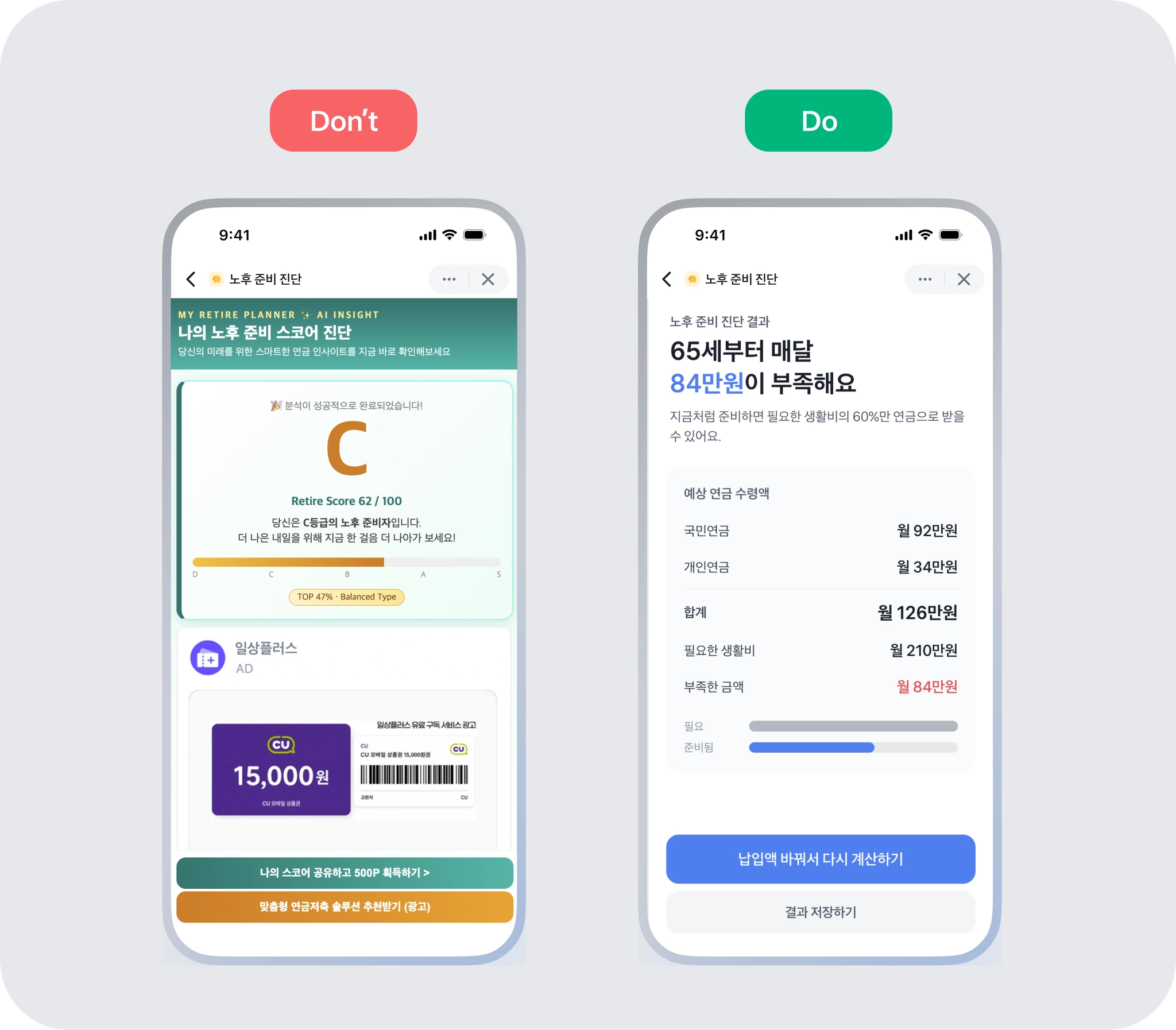
**5) Show the result users expect, and explain what it means too**
Users expect to get a certain result based on the app’s title and introduction. On the result screen, show the information that was introduced, and explain what the score or type means as well.
*※ Apps without a separate result screen, such as calculators, random pickers, or quote apps, are excluded from evaluation for this item.*
**`Production guide`**
* Please write the app name and introduction based on what can actually be confirmed on the result screen.
* If the result alone makes it hard to understand things like scores, grades, or types, show an explanation along with it.
* If the result changes based on input or selection, make sure the changes are reflected in the result.
* Explain why the result changed so users can understand it.
* If there is nothing to show, let users know why the screen is empty.
**`Checklist`**
* [ ] Can users confirm on the result screen the information written in the title and introduction?
* [ ] Can users understand what the content on the result screen means?
* [ ] If the result changes based on input or selection, is the changed content reflected in the result?
* [ ] If the result changes based on input or selection, can users understand why it changed?
* [ ] Even on screens with nothing to show, can users understand why they are empty?
#### Criteria 2. Real usage metrics
Well-made apps have higher rates of users returning or completing purchases and reservations. So when selecting recommended mini apps, we also look at real usage metrics such as retention rate and conversion rate.
* **Retention rate:** The percentage of users who return among those who used the app.
* **Conversion rate:** The percentage of users who complete a key action such as a purchase or reservation among those who used the app.
**1) Category examples**
The metrics we check depend on the type of app. For example, an eSIM sales app would look at the percentage of completed purchases, while a daily log app would look at the return rate.
| Usage purpose | Main metric | Detailed description |
| -------------------- | --------------------------- | --------------------------------------------- |
| eSIM purchase | Purchase conversion rate | Whether visiting users complete a purchase |
| Cleaning reservation | Reservation conversion rate | Whether visiting users complete a reservation |
| Daily log | Retention rate | Whether users keep returning consistently |
**2) Register your mini app conversion metric**
For Toss to properly evaluate my mini app, please register a conversion metric in the console. The metric I set becomes the basis for calculating the service conversion rate. If “reservation completed” is the conversion metric, it calculates what percentage of people who visited the app finished a reservation. For example, if 100 people visit and 10 make a reservation, the reservation conversion rate is 10%.
Please check the guide below for how to register a conversion metric.
{% hint style="info" %}
**Detailed setup method**
* To record actions in the app → [Event recording guide](https://developers-apps-in-toss.toss.im/guide/analytics/logging)
* To set metrics in the console → [Conversion metric setup guide](https://developers-apps-in-toss.toss.im/guide/analytics/conversion-metrics)
{% endhint %}
#### Criteria 3. Reviews
**1) Manage ratings**
Not only ratings but also review content is reflected in the selection of recommended mini apps. Ask users who completed a purchase or reservation for reviews, and check rating changes in the console’s “Ratings and reviews.”
**2) Check reviews and improve**
You can view all reviews for your app in the console’s “Ratings and reviews” menu. If multiple users mention the same inconvenience, start by improving that part.
#### Criteria 4. Performance
We check whether the app takes too long to open and whether it works without issues while in use. If the app closes or freezes right after opening and becomes unusable, it will be disadvantaged in evaluation. Please run the app yourself, try the main features, and check for slow or error-prone parts.
***
### 3. Boosting mini apps
**Among recommended mini apps, apps that stand out as especially well made are selected as “boosting mini apps” and receive exceptional support.** From a dedicated recommendation area at the top of the All tab to the Toss home screen, they are featured in the most visible places and in the most noticeable formats. Based on data measured during the beta test period, they are expected to be exposed 20 times more than recommended mini apps.
#### Boosting mini app selection criteria
**1) Real usage metrics within the category**
We check whether the app is in the top tier for retention rate or purchase/reservation conversion rate compared with apps in the same category.
**2) Final editor review**
The editor personally uses the app and checks its completeness and usefulness firsthand.
If you have any questions about the new exposure policy, [Channel Talk](https://apps-in-toss.channel.io/home?page=https%3A%2F%2Fapps-in-toss.channel.io%2Fworkflows%2F787658)please contact us. So that the joy of creating mini apps can lead to the delight of meeting users, the Apps in Toss team will do our best too.
---
# Agent Instructions
This documentation is published with GitBook. GitBook is the documentation platform designed so that both humans and AI agents can read, navigate, and reason over technical content effectively. Learn more at gitbook.com.
## Querying This Documentation
If you need additional information that is not directly available in this page, you can query the documentation by asking a question.
Perform an HTTP GET request on the following URL with the `ask` and `goal` query parameters:
```
GET https://developers-apps-in-toss.toss.im/guide/en/exposure.md?ask=&goal=
```
`ask` is the immediate question: it should be specific, self-contained, and written in natural language.
`goal` is what the user is ultimately trying to achieve, the reason they need the answer. Sharing it helps GitBook give you a better, more relevant answer. A goal is most helpful when it describes the outcome the user wants rather than restating the question. For example, with `ask=how do I create an API token`, a goal like `automate deployments from our CI pipeline` lets GitBook tailor the answer to that use case.
The response will contain a direct answer to the question and relevant excerpts and sources from the documentation.
Use this mechanism when the answer is not explicitly present in the current page, you need clarification or additional context, or you want to retrieve related documentation sections.