> For the complete documentation index, see [llms.txt](https://developers-apps-in-toss.toss.im/llms.txt). Markdown versions of documentation pages are available by appending `.md` to page URLs; this page is available as [Markdown](https://developers-apps-in-toss.toss.im/documentation/api-and-sdk-zh/integration/getting-started.md).
# 开始使用
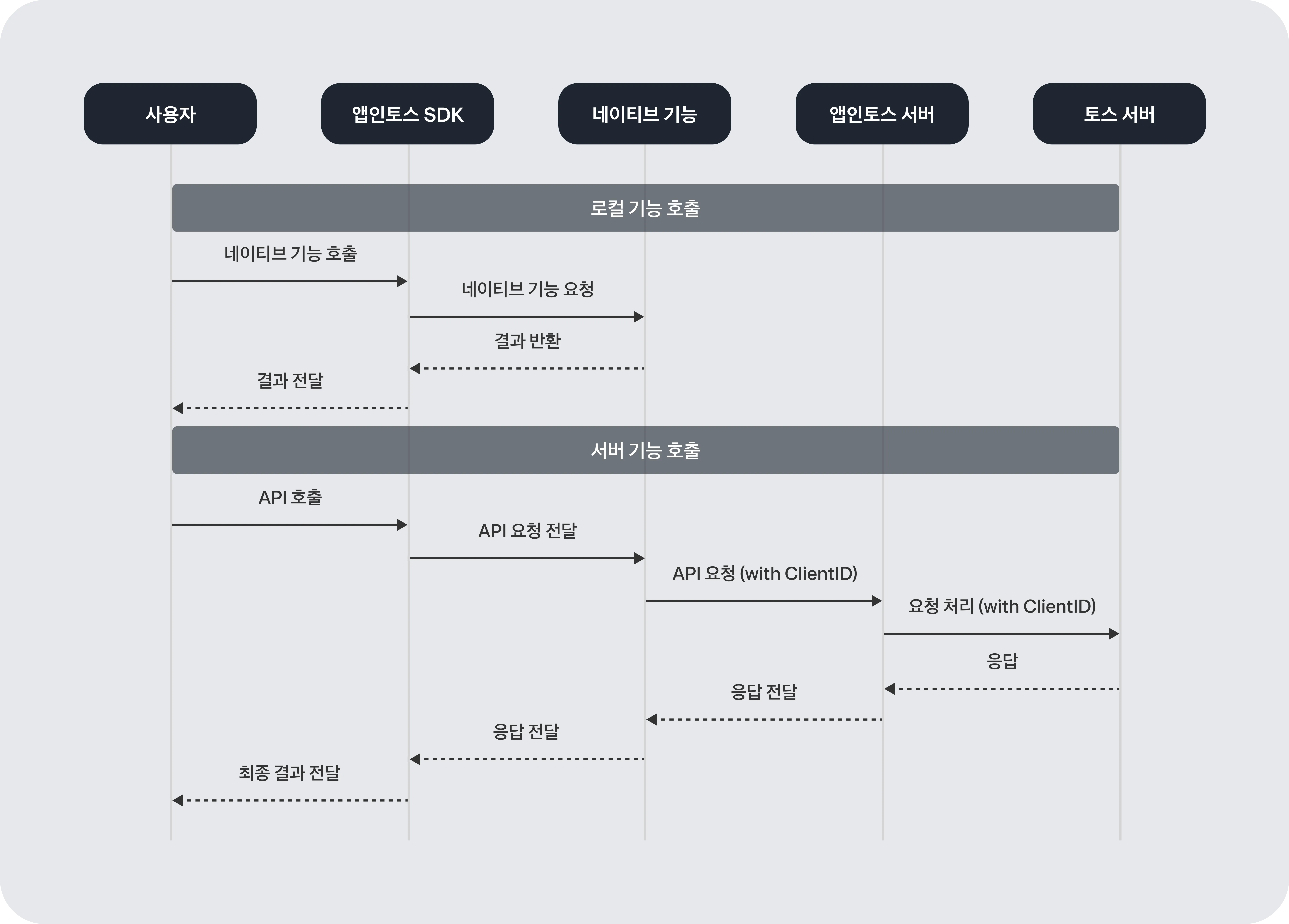
Apps in Toss 是 **客户端 SDK**和 **服务器 API** 可通过两种方式接入。SDK 负责构建 Toss App 内的迷你应用运行环境,API 通过服务器间通信处理登录·支付等核心功能。
[查看示例项目 ↗](https://github.com/toss/apps-in-toss-examples/tree/main)
[查看示例合集 ↗](https://github.com/toss/apps-in-toss-examples/tree/main/examples)
{% hint style="info" %}
**请注意**
不能使用 iframe。使用 iframe 时,Apps in Toss 功能无法正常工作,并且也会在内部安全审核中被驳回。不过,用于嵌入 YouTube 视频内容时,可以例外使用 iframe。
{% endhint %}
***
### Apps in Toss 架构
Apps in Toss 主要由 **SDK(客户端)** 和 **服务器 API** 两层构成。
SDK 将相机、位置信息、支付 UI 等 **原生功能**桥接到迷你应用中直接使用。服务器 API 则 **负责合作方服务器与 Apps in Toss 服务器之间的通信**。登录令牌验证、支付审批、智能发送等需要在服务器端处理的功能都属于这里。
#### SDK — 迷你应用运行环境
合作方可以 **WebView SDK** 或 **React Native SDK** 选择其中之一来开发迷你应用。两个 SDK 都 `Granite`将 Granite 作为公共运行时层使用。
| SDK | 说明 |
| ---------------- | ----------------------------- |
| WebView SDK | 可以将现有 Web 服务快速在 Toss App 中运行。 |
| React Native SDK | 在需要原生级性能和 Toss App 集成时使用。 |
合作方只需接入 SDK 并上传构建产物,经过内部审核流程后即可立即发布。无需复杂的原生开发,也能直接使用登录·支付·认证等核心功能。
#### 服务器 API — 服务器间通信
登录令牌验证、支付处理、智能发送等 **合作方服务器 ↔ Apps in Toss 服务器** 之间通过 API 通信处理。所有 API 通信都 **由 mTLS(双向 TLS 认证)** 保护。
***
### SDK 介绍
Apps in Toss SDK 的核心是 `Granite`。 `Granite`负责初始化应用运行环境,并承担与 Toss App 通信的公共运行时层。
#### AppsInToss
`AppsInToss.registerApp`负责设置服务的基础环境,帮助你无需复杂的初始配置即可快速开始开发。 **`appName`只要传入** 就能立即使用以下功能。
* **基于文件的路由**:像 Next.js 一样,路径与 URL 会自动映射。
* 示例: `/my-service/pages/home.ts` → `intoss://my-service/home`
* **查询参数处理**:可以直接使用 URL scheme 参数(如 referrer 等)。
* **返回控制**:可拦截返回事件,处理弹窗显示或关闭页面。
* **屏幕可见性检测**:可根据屏幕显示或隐藏事件来控制行为。
**签名**
```typescript
AppsInToss: {
registerApp(
AppContainer: ComponentType>,
{ appName, context, router }: BedrockProps
): (initialProps: InitialProps) => JSX.Element;
readonly appName: string;
}
```
**示例:注册应用**
```tsx
import { AppsInToss } from '@apps-in-toss/framework';
import { PropsWithChildren } from 'react';
import { InitialProps } from '@granite-js/react-native';
import { context } from '../require.context';
function AppContainer({ children }: PropsWithChildren) {
return <>{children};
}
// 只传入 appName 和 context 就能完成基本设置。
export default AppsInToss.registerApp(AppContainer, { context });
```
#### InitialProps
用户进入页面时,由原生端(Android / iOS)传递给应用的 **初始数据类型**。其结构会根据平台而不同。
```typescript
type InitialProps = AndroidInitialProps | IOSInitialProps;
```
**属性**
* **platform** · 必填 · `'ios' | 'android'`
当前应用正在运行的平台。
* **initialColorPreference** · 必填 · `ColorPreference`
初始颜色主题。表示用户设置的颜色主题。
* **networkStatus** · 必填 · `NetworkStatus`
当前设备的网络连接状态及所连接的网络。
* **scheme** · `string`
用于进入当前页面的 URL scheme。
* **initialFontSize** · 必填 · ``xSmall` | `Small` | `Medium` | `Large` | `xLarge` | `xxLarge` | `xxxLarge` | `A11y_Medium` | `A11y_Large` | `A11y_xLarge` | `A11y_xxLarge` | `A11y_xxxLarge``
(仅 iOS) 这是 iOS 系统字体大小。默认值为 `Large`。
* **isVisible** · 必填 · `boolean`
(仅 iOS) 当前屏幕是否可见。初始值为 `true`。
* **initialFontScale** · 必填 · `string`
(仅 Android) 反映 Android 无障碍设置的系统字体缩放。
**示例:利用初始数据**
```tsx
import { AppsInToss } from '@apps-in-toss/framework';
import { PropsWithChildren } from 'react';
import { InitialProps } from '@granite-js/react-native';
import { context } from '../require.context';
function AppContainer({ children, ...initialProps }: PropsWithChildren) {
// 进入页面时可以利用原生端传下来的初始值
console.log({ initialProps });
return <>{children};
}
export default AppsInToss.registerApp(AppContainer, { context });
```
***
### 使用 API
{% hint style="info" %}
**仅在需要接入服务器 API 时查看**
在使用 Toss 登录、Toss Pay、智能发送等需要服务器间通信的功能时进行设置。若只使用 SDK,可跳过本节。
{% endhint %}
mTLS 证书设置、防火墙配置、API 通用规范 [使用 API 文档](/documentation/api-and-sdk-zh/integration/server-api.md)中查看。
---
# Agent Instructions
This documentation is published with GitBook. GitBook is the documentation platform designed so that both humans and AI agents can read, navigate, and reason over technical content effectively. Learn more at gitbook.com.
## Querying This Documentation
If you need additional information that is not directly available in this page, you can query the documentation by asking a question.
Perform an HTTP GET request on the following URL with the `ask` and `goal` query parameters:
```
GET https://developers-apps-in-toss.toss.im/documentation/api-and-sdk-zh/integration/getting-started.md?ask=&goal=
```
`ask` is the immediate question: it should be specific, self-contained, and written in natural language.
`goal` is what the user is ultimately trying to achieve, the reason they need the answer. Sharing it helps GitBook give you a better, more relevant answer. A goal is most helpful when it describes the outcome the user wants rather than restating the question. For example, with `ask=how do I create an API token`, a goal like `automate deployments from our CI pipeline` lets GitBook tailor the answer to that use case.
The response will contain a direct answer to the question and relevant excerpts and sources from the documentation.
Use this mechanism when the answer is not explicitly present in the current page, you need clarification or additional context, or you want to retrieve related documentation sections.