> For the complete documentation index, see [llms.txt](https://developers-apps-in-toss.toss.im/llms.txt). Markdown versions of documentation pages are available by appending `.md` to page URLs; this page is available as [Markdown](https://developers-apps-in-toss.toss.im/documentation/api-and-sdk-en/integration/getting-started.md).
# Getting started
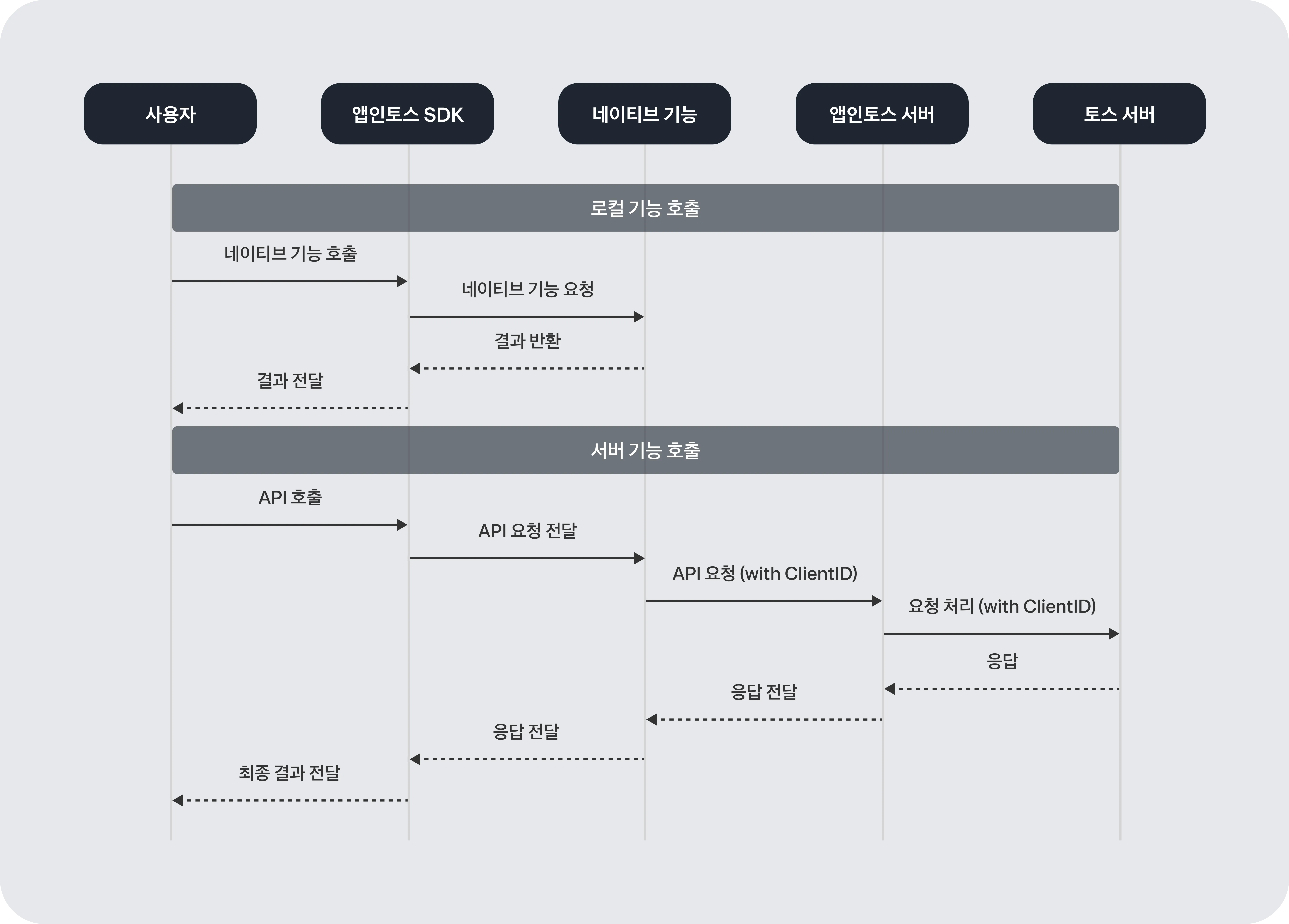
Apps in Toss **Client SDK**and **Server API** It integrates in two ways: SDK and API. The SDK configures the mini-app runtime environment inside the Toss app, and the API handles core functions such as login and payments through server-to-server communication.
[View sample project ↗](https://github.com/toss/apps-in-toss-examples/tree/main)
[View examples ↗](https://github.com/toss/apps-in-toss-examples/tree/main/examples)
{% hint style="info" %}
**Please note**
iframe cannot be used. If you use iframe, Apps in Toss features will not work properly, and it will also be rejected in the internal security review. However, iframe may be used as an exception when embedding YouTube video content.
{% endhint %}
***
### Apps in Toss architecture
Apps in Toss is broadly **SDK (client)** and **Server API** made up of two layers.
The SDK acts as a bridge so that **native features**can be used directly in mini-apps. The server API handles **communication between the partner company server and the Apps in Toss server**. Features that need to be handled on the server, such as login token verification, payment approval, and smart sending, fall here.
#### SDK — Mini-app runtime environment
Partners **WebView SDK** or **React Native SDK** choose one to develop their mini-apps. Both SDKs use `Granite`as the common runtime layer.
| SDK | Description |
| ---------------- | ---------------------------------------------------------------------------------- |
| WebView SDK | You can quickly run an existing web service in the Toss app. |
| React Native SDK | Use this when you need native-level performance and integration with the Toss app. |
Partners can simply integrate the SDK and upload the build artifact, and then release it immediately after the internal review process. You can use core functions such as login, payments, and authentication right away without complex native development.
#### Server API — server-to-server communication
Login token verification, payment processing, and smart sending are **communication between the partner company server ↔ Apps in Toss server** handled through API communication. All API communication is protected by **mTLS (mutual TLS authentication)** protected.
***
### SDK introduction
The core of the Apps in Toss SDK is `Granite`. `Granite`is a common runtime layer that initializes the app runtime environment and handles communication with the Toss app.
#### AppsInToss
`AppsInToss.registerApp`sets the service's basic environment and helps you start development quickly without complicated initial setup. **`appName`Even just passing** you can immediately use the features below.
* **File-based routing**: Paths and URLs are automatically mapped, just like in Next.js.
* Example: `/my-service/pages/home.ts` → `intoss://my-service/home`
* **Query parameter handling**: URL scheme parameters (such as referrer) can be used directly.
* **Back button control**: You can intercept back button events to show dialogs or close the screen.
* **Screen visibility detection**: You can control behavior according to events when the screen becomes visible or hidden.
**Signature**
```typescript
AppsInToss: {
registerApp(
AppContainer: ComponentType>,
{ appName, context, router }: BedrockProps
): (initialProps: InitialProps) => JSX.Element;
readonly appName: string;
}
```
**Example: Registering an app**
```tsx
import { AppsInToss } from '@apps-in-toss/framework';
import { PropsWithChildren } from 'react';
import { InitialProps } from '@granite-js/react-native';
import { context } from '../require.context';
function AppContainer({ children }: PropsWithChildren) {
return <>{children};
}
// If you pass only appName and context, the default setup is complete.
export default AppsInToss.registerApp(AppContainer, { context });
```
#### InitialProps
The initial data type that native (Android / iOS) passes to the app when the user enters the screen **initial data type**It varies by platform.
```typescript
type InitialProps = AndroidInitialProps | IOSInitialProps;
```
**Properties**
* **platform** · Required · `'ios' | 'android'`
The platform where the current app is running.
* **initialColorPreference** · Required · `ColorPreference`
The initial color theme. It represents the user's configured color theme.
* **networkStatus** · Required · `NetworkStatus`
The current device's network connection status and connected network.
* **scheme** · `string`
The URL scheme used to enter the current screen.
* **initialFontSize** · Required · ``xSmall` | `Small` | `Medium` | `Large` | `xLarge` | `xxLarge` | `xxxLarge` | `A11y_Medium` | `A11y_Large` | `A11y_xLarge` | `A11y_xxLarge` | `A11y_xxxLarge``
(iOS only) The iOS system font size. The default is `Large`.
* **isVisible** · Required · `boolean`
(iOS only) Whether the current screen is visible. The initial value is `true`.
* **initialFontScale** · Required · `string`
(Android only) The system font scale that reflects Android accessibility settings.
**Example: Using initial data**
```tsx
import { AppsInToss } from '@apps-in-toss/framework';
import { PropsWithChildren } from 'react';
import { InitialProps } from '@granite-js/react-native';
import { context } from '../require.context';
function AppContainer({ children, ...initialProps }: PropsWithChildren) {
// You can use the initial values provided by native when entering the screen
console.log({ initialProps });
return <>{children};
}
export default AppsInToss.registerApp(AppContainer, { context });
```
***
### Using the API
{% hint style="info" %}
**Check only if server API integration is required**
Set this when using features that require server-to-server communication, such as Toss Login, Toss Pay, and smart sending. If you only use the SDK, you can skip this section.
{% endhint %}
The mTLS certificate setup, firewall configuration, and API common specifications are [API usage guide](/documentation/api-and-sdk-en/integration/server-api.md)Please check in.
---
# Agent Instructions
This documentation is published with GitBook. GitBook is the documentation platform designed so that both humans and AI agents can read, navigate, and reason over technical content effectively. Learn more at gitbook.com.
## Querying This Documentation
If you need additional information that is not directly available in this page, you can query the documentation by asking a question.
Perform an HTTP GET request on the following URL with the `ask` and `goal` query parameters:
```
GET https://developers-apps-in-toss.toss.im/documentation/api-and-sdk-en/integration/getting-started.md?ask=&goal=
```
`ask` is the immediate question: it should be specific, self-contained, and written in natural language.
`goal` is what the user is ultimately trying to achieve, the reason they need the answer. Sharing it helps GitBook give you a better, more relevant answer. A goal is most helpful when it describes the outcome the user wants rather than restating the question. For example, with `ask=how do I create an API token`, a goal like `automate deployments from our CI pipeline` lets GitBook tailor the answer to that use case.
The response will contain a direct answer to the question and relevant excerpts and sources from the documentation.
Use this mechanism when the answer is not explicitly present in the current page, you need clarification or additional context, or you want to retrieve related documentation sections.